Cable (from radio to capture card INPUT)
https://amzn.to/45sg4Tl
USB Dongle (plugs into computer USB plug)
https://amzn.to/3HAcr4A
Buy the capture card below if you also want to show the rig screen on a monitor.
USB Capture Card (pass through)
https://amzn.to/4fLsvx1
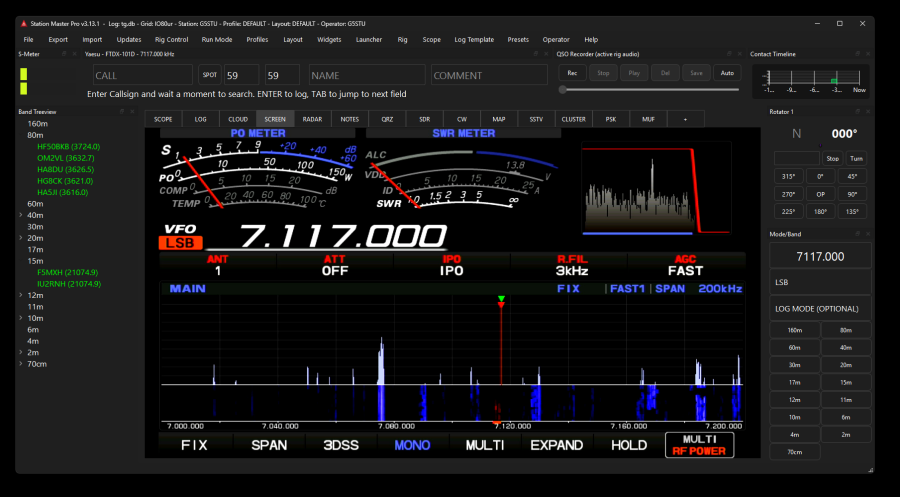
Once you have the above connected, open the SCREEN tab in SM Pro, right click over the main area and use the menu to select your capture card which will be listed in a list with any webcams you have. Try them all until you see your rig screen.
Some radios such as the Yaesu require your to enable Video Out in the menu system.
DVI Cable and Capture Dongle for connecting ICOM or YAESU video feed to Station Master Pro
Log in to comment
G5EDB
I like this, will save me having a floating ft710 display on my stream
4 months ago
M
MM7WWS
any instructions on how to do this ? seen it last night on youtube and it did look awsome.. i have a ftdx101
3 months ago
WA4UVH
Looks fantastic but with the FT-710’s terrible reputation (true or false) for anything but a straight DVI monitor connected to the radio causing the external video output to permanently fail, I’m afraid to try this adapter.
1 month ago
G5STU
I am fairly confident you have nothing to worry about I know many many people that use these capture dongles on all models of yaesu And not one of them has ever told me they've had a problem. The problems arise when plugging it into a television. - however please note with the 710 Stationmaster can actually display the normal scope - so this additional video feed is nice but not required. 73
1 month ago