Station Master now supports connecting directly to a FlexRadio without requiring any intermediary software or a Maestro device. Alternatively, you can connect Station Master to SmartSDR or to a session running on a Maestro device.
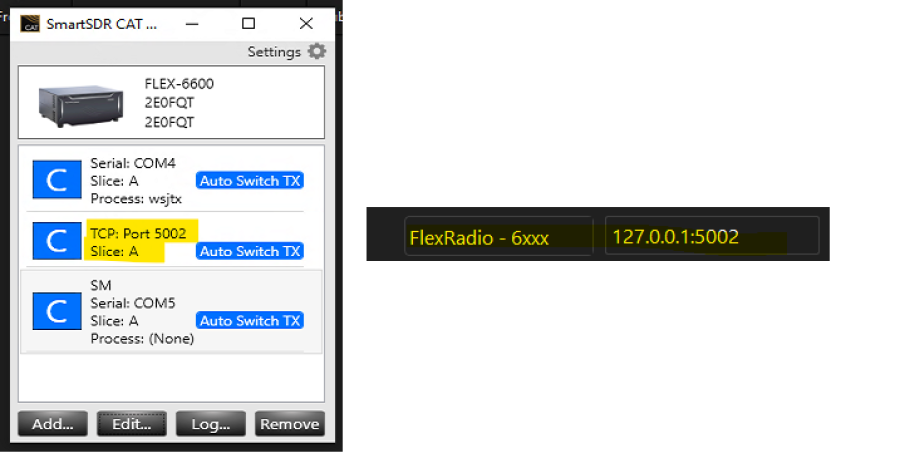
In the rig list within Station Master, you will see two options: **FLEX** and **FLEX2**.
When using either of these options, Station Master will attempt to automatically detect the correct connection settings when connecting to the radio. If automatic detection does not work, you should manually enter the correct IP address and port number.
Note that the image shown here applies when using the **FlexRadio 6xxx** connection option. This option will work with newer FlexRadio models; however, spectrum and scope data are not available through this connection method. For that reason, it is provided primarily as a backup connection option.
How to set up a FLEX with Station Master Pro
Log in to comment

G5STU
I am in the process on implementing tighter Flex API support, negating the need for SmartSDR for CAT Control (hopefully).
4 months ago

LA2PIA
Hi Stu, what is the status with a more integrated Flexradio scope solution?
1 month ago
G5STU
Hello yes, there are two new options in the rig type list for FLEX and FLEX2 - try those.
1 month ago

N5COP
Thank you for your hard work on SMP Stu!! I am using a Flex 6500 and the CAT is working great. When the audio finally locks in, there is a lot of noise that pops up and you can barely hear the signal. Once I turn SMP off the rf noise goes away and signal is clear again. I am using ethernet cables with ferrite chokes hoping it would help.....it doesn't. Thank again for putting together a premier piece of software together for the ham community. Frank N5COP
1 month ago
M7IXB
I get exactly the same thing, i have to turn off rig control thebrd noise goes away.
1 month ago
N5COP
I really wanted to use the external speakers on the flex and could never get the noise out or hear other stations. I tried the onboard audio on the computer and everything works great! CAT control, audio and all functions seem to be ok. I'm hoping to figure out how to get the flex speakers to work. If I do, I will post here if a solution is found.
1 month ago