Hi
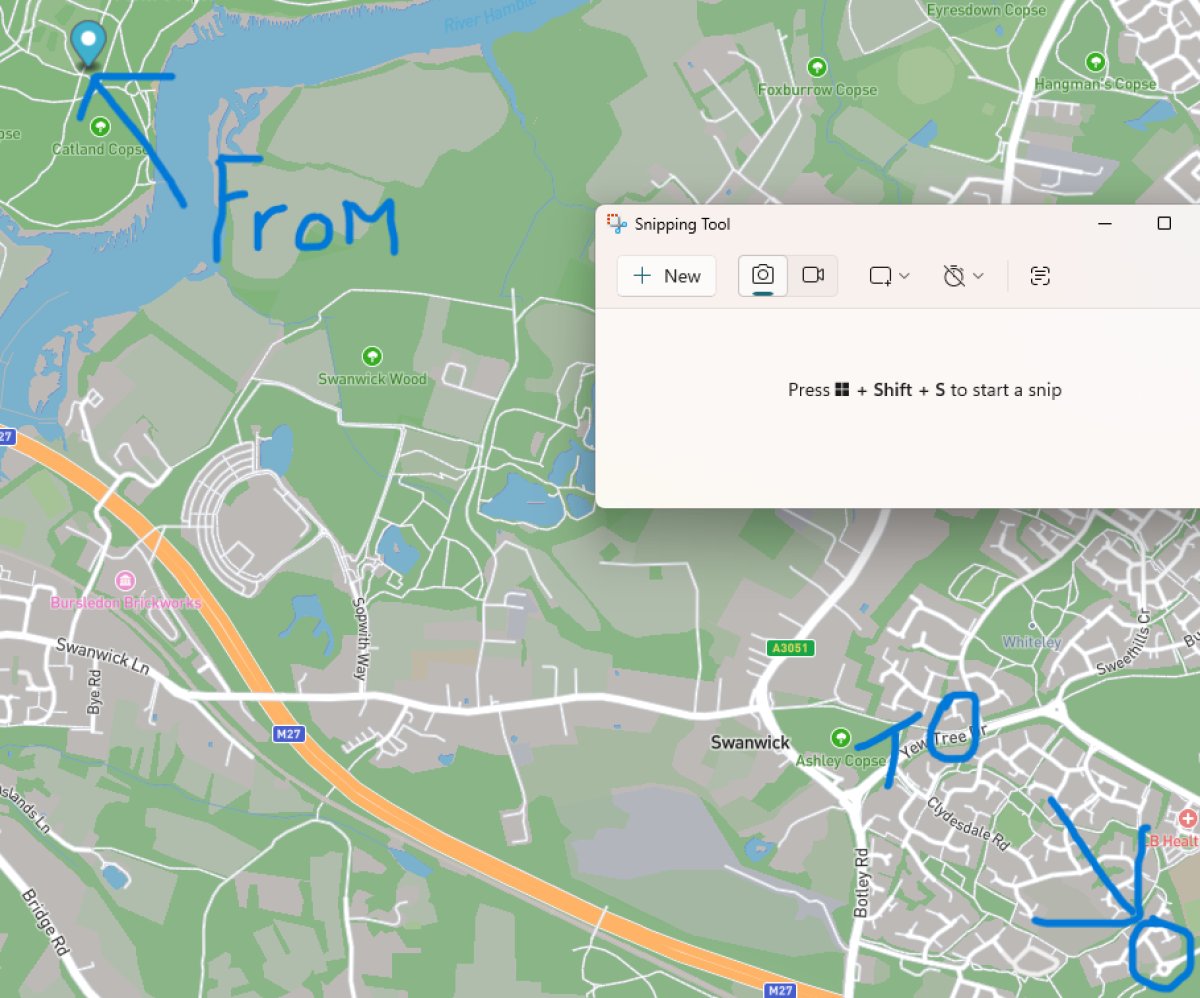
How do i change my QTH from top left to bottom right?
this is all IO90iv
many thanks
Pete
Hi How do i change my QTH from top left to bottom right? this is all IO90iv many thanks Pete
Log in to comment
G5STU
perhaps try putting in a longer grid locator.
5 months ago

M6PDR
and where do i find a longer grid locator? I thought a grid square was just 6 long IO90iv
5 months ago
M6PDR
its all set right on qrz . i thought it took the mapping from qrz.
5 months ago
G5STU
I'll have a closer look at this today.
4 months ago
M6PDR
thank you Stu
4 months ago
G5STU
If you check the profile edit screen here in the cloud, you will find you can now set your lat and lon (optional). As for the desktop app, is that where you took the screenshot? Only you see that so does it really need to be totally accurate ? If so then I can add a lat/lon setting to the desktop app too.
4 months ago
M6PDR
Its not that its got to be accurate Stu, its about 6miles away in the middle of a field lol. Ive put the lat and lon in and still not anywhere near my house.
4 months ago
G5STU
Hey Pete, I've not made any changes to the desktop app yet, I'll aim to do that today. Setting your lat and lon in the cloud only affects the map on your cloud profile file. Thanks, Stu
4 months ago