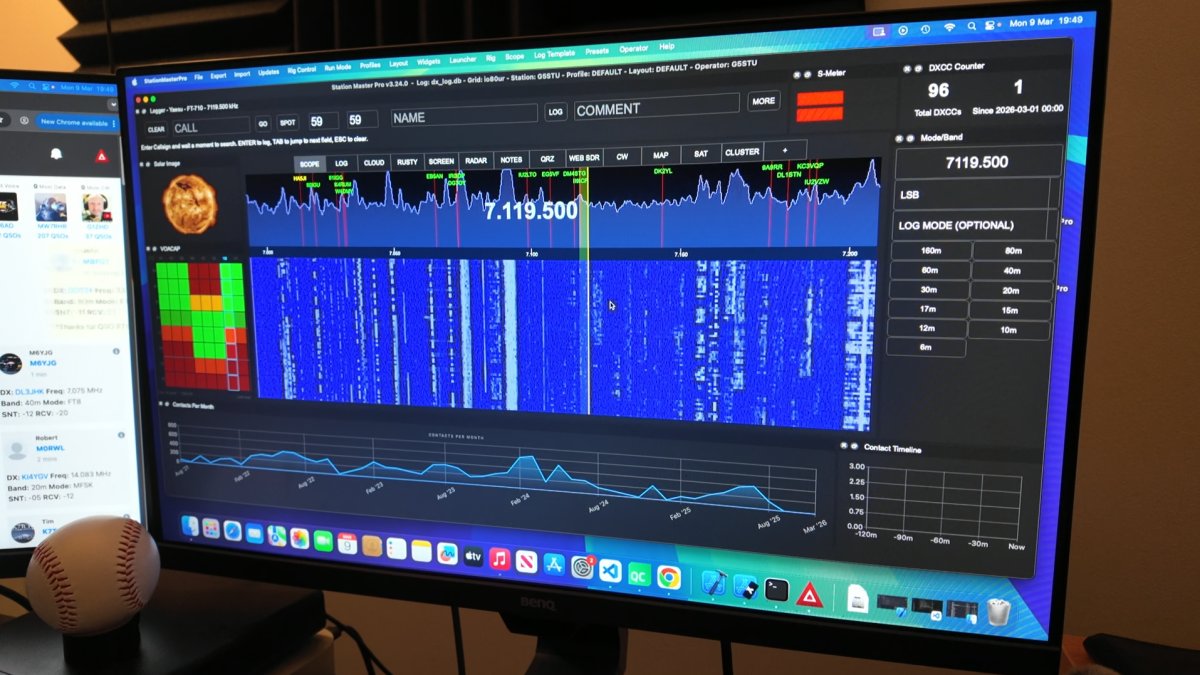
Station Master PRO can display the 710's scope without the need for any other device such as a SDR Play or SDR Switch - it's just the normal USB cable used for CAT Control - you don't need to change anything related to cables.
1. In the 710 "Operation Settings" menu under "General", scroll to the bottom to find option "SCU-LAN10" and turn that ON
2. Connect the 710 as normal using the "Yaesu FT-710" rig type (it must be this option)
3. Assuming you configured Rig #1, you should then select that Rig #1 from the Scope menu in Station Master Pro tops menu
Once working, right click over the scope in SM to adjust levels to fix how it looks.
This will work on Windows, Mac and Linux - Everything to make this work in built into Station Master but some Windows 10 users have reported an issue with the scope not working.
If you are on WINDOWS and unstable to get the scope to work you should install this FTDI driver. https://ftdichip.com/wp-content/uploads/2025/03/CDM2123620_Setup.zip
If you have a Windows ARM PC you should install the ARM driver instead https://ftdichip.com/wp-content/uploads/2025/03/CDM-v2.12.36.20-for-ARM64-WHQL-Certified.zip
YAESU FT-710 Spectrum Scope via USB Cable
Log in to comment
M0JON
Thanks for the instructions which got the scope working but for some reason the frequency on the SM is not reflecting what is on my radio !!!
1 month ago
G5STU
hello, the scope and CAT control are not the same thing. Please follow the yaesu CAT setup guide.
1 month ago