Controlling Your Expert Amplifier From Station Master Pro v3.31.8 and newer
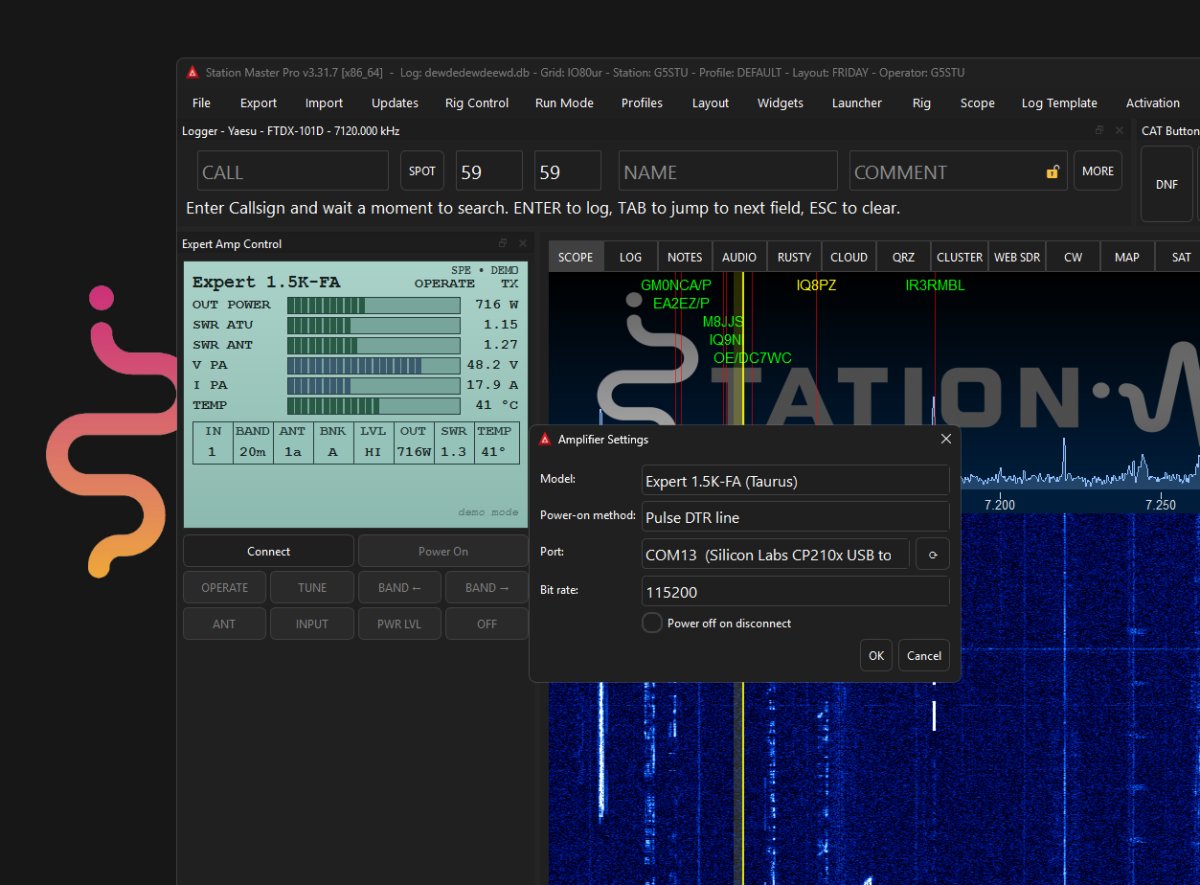
Station Master Pro includes a built-in Amplifier Controller that lets you operate your SPE Expert linear amplifier directly from the app. Instead of reaching for the front panel, you can watch the amp's real-time status, switch between Operate and Standby, run an antenna tune, change bands, and read your power and SWR meters, all from a panel styled to match the familiar Expert display.
The controller supports the SPE Expert family of amplifiers: the 1K-FA, the 1.3K-FA, the 1.5K-FA (also known as the Taurus), and the 2K-FA. You can let the app auto-detect your model once it connects, or pick your exact model in Settings so the correct bit rate and behaviour are used right away.
Connecting To Your Amp
Connecting is done over a serial (CAT) link, the same control connection the Expert amplifiers use for computer control. Run a USB or serial cable from your PC to the control port on the back of the amplifier, then open the Amplifier Controller settings in Station Master Pro. Choose the serial port your amp appears on, select your model (or leave it on Auto-detect), and confirm the bit rate. Most Expert models run at 115200; the 1K-FA uses 9600. If you select your model from the list, Station Master Pro offers the right default bit rate for you. Once the port and model are set, press Connect, and the controller will begin reading live status from the amp.
A Note On Powering The Amp On
The Power On feature is the one area that varies the most from amp to amp, so it deserves a little extra attention. Waking an Expert amplifier from a fully powered-off state is not a simple matter of sending one universal command. Depending on your model, your firmware, and whether you (or your cable) include the extra power-on wiring, the amp may respond to a software command, or it may need a control line on the serial cable to be asserted or pulsed instead.
Because of this, Station Master Pro gives you several power-on methods to choose from in Settings: Auto (which picks a method based on your model), the RCU_ON command, Assert RTS, Assert DTR, Pulse RTS, and Pulse DTR. There is no single correct answer that works for every setup. You will need to try the different options one at a time to discover which one, if any, actually powers your amplifier on. Start with Auto, and if nothing happens, work through the RTS and DTR line options. If your cable or amp does not include the necessary power-on circuitry, it is possible that none of the methods will wake it from fully off, and you will need to switch it on at the amplifier itself before connecting.
Once you have found the method that works for your amp, set it in Settings and it will be remembered. From then on, powering up, operating, tuning, and monitoring your Expert amplifier is just a click away inside Station Master Pro.